Keyboard fonts
Type or paste up to 200 characters and this font generator shows them in eight styles you can copy and paste as ordinary text.
Tap a style to copy it
Your text is converted in your browser. None of it is sent anywhere.
Type these styles without copying
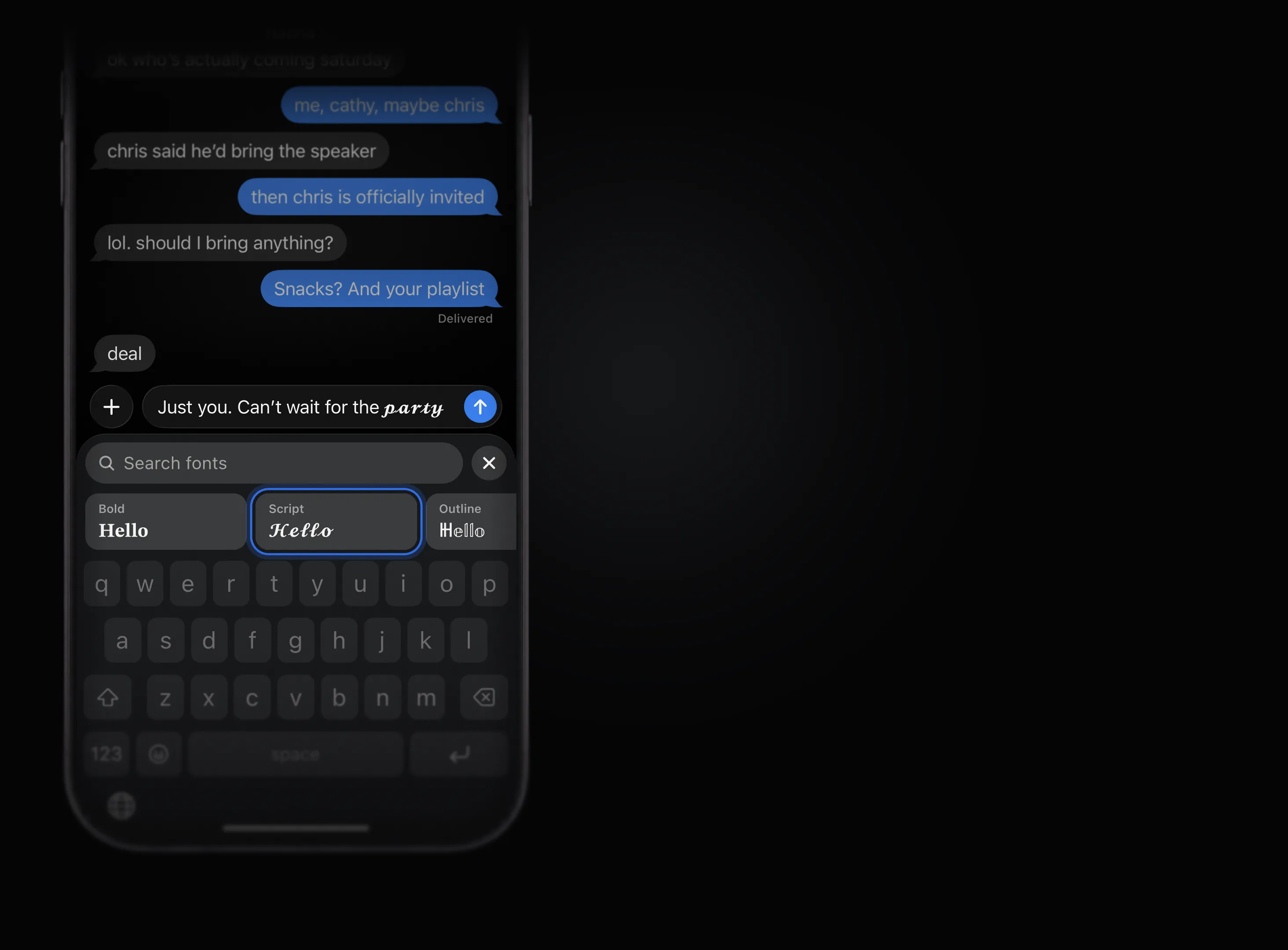
Better Keyboard has all eight in a fonts panel above the keys. Pick a style and it's applied as you type.
App Store
Google Play
What keyboard fonts really are
Keyboard fonts are characters. A real font changes how the letter A is drawn and leaves the text alone. The styles on this page change the text: each letter is swapped for a different Unicode character that looks like a bold, script or circled version of it. 𝐀 is a character of its own, at code point U+1D400, as separate from A as B is.
That’s why the style survives a copy and paste. There’s no formatting for a text field to strip, because the styled letters are the text, and they paste anywhere text goes. It’s also why a page like this gets called a font generator, or “copy and paste fonts”, though no font is involved.
The same fact has a cost. Software reads these as different characters too, which matters for screen readers and character limits. That part is under Before you use them.
The eight styles, side by side
These are the eight styles in Better Keyboard’s fonts panel, under the names people search for. Each links to its own page.
| Style | “Abc 123” | What Unicode calls it | Own digits | Letters from another block |
|---|---|---|---|---|
| Bold | 𝐀𝐛𝐜 𝟏𝟐𝟑 | Mathematical Bold | Yes | 0 |
| Cursive | 𝓐𝓫𝓬 123 | Mathematical Bold Script | No | 0 |
| Italic | 𝐴𝑏𝑐 123 | Mathematical Italic | No | 1 |
| Gothic | 𝕬𝖇𝖈 123 | Mathematical Bold Fraktur | No | 0 |
| Outline | 𝔸𝕓𝕔 𝟙𝟚𝟛 | Mathematical Double-Struck | Yes | 7 |
| Bubble | Ⓐⓑⓒ ①②③ | Circled Latin letters | Yes | 0 |
| Monospace | 𝙰𝚋𝚌 𝟷𝟸𝟹 | Mathematical Monospace | Yes | 0 |
| Strikethrough | A̶b̶c̶ 1̶2̶3̶ | Combining Long Stroke Overlay | Any character | 0 |
The six “Mathematical” styles take most of their letters from one Unicode block, Mathematical Alphanumeric Symbols, which starts at U+1D400. Bubble comes from a different block, Enclosed Alphanumerics. Strikethrough swaps nothing: it adds one character, U+0336, after each character you typed, and that character draws the line.
The last column counts the letters that sit outside the main run. Unicode’s standard explains them: “There are 24 double-struck, italic, Fraktur, and script characters that already exist in the Letterlike Symbols block (U+2100..U+214F).” Those 24 weren’t encoded twice. The standard says “corresponding holes have been left in the mathematical alphabets”, and a style built on one of those alphabets fills each hole with the older letter. In this tool only two styles do: Outline uses 7 of them and Italic 1. Cursive and Gothic use Unicode’s bold script and bold Fraktur alphabets, which are complete and have no holes. A borrowed letter can look a little different from its neighbors, because it’s a character from another block. The ranges and names here were checked against Unicode’s character data on November 27, 2026.
What changes and what stays plain
The letters A to Z and a to z change in every style. Everything else depends on what Unicode has.
- Digits. Bold, Outline, Bubble and Monospace have their own 0 to 9. Cursive, Italic and Gothic don’t, so a 7 stays a plain 7.
- Accented letters. They keep their accents on the styled letter: é becomes 𝐞́.
- Letters with no plain A to Z underneath. ß and ø pass through unchanged, and so do other alphabets.
- Emoji and punctuation. Unchanged, except in Strikethrough, which puts a stroke after every visible character and skips the spaces.
One more thing can look wrong and isn’t. A device that has no drawing for a character shows an empty box in its place. The text you pasted is intact; that screen can’t draw it.
One line in five styles
Here is “Game night, Friday 8” as the tool converts it, with its length in UTF-16 units, the unit this page’s 200-character field counts in.
| Style | Result | Length |
|---|---|---|
| Plain | Game night, Friday 8 | 20 |
| Bold | 𝐆𝐚𝐦𝐞 𝐧𝐢𝐠𝐡𝐭, 𝐅𝐫𝐢𝐝𝐚𝐲 𝟖 | 36 |
| Cursive | 𝓖𝓪𝓶𝓮 𝓷𝓲𝓰𝓱𝓽, 𝓕𝓻𝓲𝓭𝓪𝔂 8 | 35 |
| Bubble | Ⓖⓐⓜⓔ ⓝⓘⓖⓗⓣ, Ⓕⓡⓘⓓⓐⓨ ⑧ | 20 |
| Strikethrough | G̶a̶m̶e̶ n̶i̶g̶h̶t̶,̶ F̶r̶i̶d̶a̶y̶ 8̶ | 37 |
The lengths differ because the characters do. Each letter from the mathematical block takes two units, so the bold line is nearly twice as long as the plain one. The cursive line is one unit shorter than the bold one because its 8 stays plain: Unicode has no script digits. Bubble letters and digits are one unit each, so that line is no longer than the plain one. Strikethrough adds one unit for every character it strikes.
Copy and paste, or type them on iPhone
With this page, you type your text in the field, tap a style to copy it, switch to the app you were writing in and paste. That’s fine for a name or a line you set once.
For styles you use while you write, a keyboard is the shorter way. Better Keyboard has the same eight in a fonts panel above its keys, with a “Search fonts” field: you pick a style and what you type comes out in it, in the app you’re already in. Its own line for this is “Keyboard fonts that stay styled in Instagram, TikTok, WhatsApp and iMessage.” Fonts can be one of the shortcuts in the row above the keys. The rest of what the keyboard does is under features.
Before you use them
Six of the eight use characters Unicode didn’t make for styling. Bold, Cursive, Italic, Gothic, Outline and Monospace take most of their letters from the mathematical block, and the standard says of it: “The characters in this block are intended for use only in mathematical or technical notation, and not in nontechnical text.” And more directly, they “should not be used to represent styling of nonmathematical text.” Bubble and Strikethrough fall outside that rule. Circled letters sit in another block, and the strike is a combining mark added to ordinary text.
Screen readers have been tested on two of the styles. Adrian Roselli tested fake bold and fake italic for his article Don’t Use Fake Bold or Italic in Social Media, posted March 5, 2025 and updated November 20, 2026. The bold page quotes three of his results, and in none of them does a listener hear the styling. He tested bold and italic only. The other six styles are untested here, so don’t put anything a reader must not miss in a style.
They can turn back into plain letters. Unicode’s compatibility normalization, called NFKC, converts styled letters to plain ones: 𝕙𝕖𝕝𝕝𝕠 becomes hello. Software that applies it sees your plain text. Software that doesn’t sees different characters from the word you typed. Strikethrough is the exception: NFKC leaves its strokes in place.
Most of them use up character limits faster. Where a limit counts UTF-16 units, as the field on this page does, a letter from the mathematical block counts twice and a struck character counts twice. Bubble doesn’t: a circled letter or digit is one unit, like the plain one.
The source for the Unicode quotes is chapter 22 of the Unicode 18.0.0 core specification.
Questions
Are keyboard fonts real fonts?
No. They are Unicode characters that look like styled letters, so the style is part of the text and comes along when you copy it.
A real font changes how a letter is drawn and leaves the text alone. These styles change the text.
How do I copy and paste fonts?
Type your text in the field at the top of this page, then tap a style. That copies the styled text, and you paste it where you want it.
Why do some letters show up as empty boxes?
The device showing them has no drawing for that character, so it puts a box in its place. The text is intact, and a device that has the character shows it as you meant it.
Do keyboard fonts work with numbers?
In five of the eight styles. Bold, Outline, Bubble and Monospace have their own digits, and Strikethrough puts its stroke through any character, digits included.
Cursive, Italic and Gothic have no digits in Unicode, so numbers in those styles stay plain.
The keyboard your phone
should have come with
Dictate, swipe or type in any app, and it comes out right. None of it leaves your phone.